User-made sighting reticles
Custom skins
OLD‑WIKI.WARTHUNDER.COM (DEFUNCT)
 | Relevance under question. The content of this article is most likely outdated and is not reflecting the current state of affairs. The article needs to be updated. |
The default sighting reticle for ground vehicles in War Thunder can be replaced with a custom one, for example if you want to recreate a historical representation of the sight.
Custom sights will be created by changing settings in the reticle file rather than in any graphic editor.

|
Note! The custom sight does not guarantee the accuracy or correct aiming if it has been created by an author without taking into account all the recommendations in this article. |
The ability to create user-made sight grid designs for ground vehicles was added in update 1.73 "Vive la France".
How to setup a user-made sight
- Place the ground vehicle for which you want to replace the sighting reticle into the hangar.
- Open
game settings → Main parameters → Common battle settingsand for the parameter “Use alternative sight grid” select “Add grid sight”. - Two sub folders will be created In the UserSights folder which is located in the game directory:
- A folder with the name of the selected vehicle containing the file ‘sight_1.blk’ (this is a template for the default sight)
- A folder with the name “all_tanks”
- Without closing the game client, copy the custom reticle into the created vehicle name folder if you want to apply the new reticle only to it. Or if the reticle is suitable for several vehicles, copy the file to the “all_tanks” folder.
- Return to the game, press Alt + F9 to update game data and select the uploaded reticle..
The number of different sight reticles per vehicle is not limited. So you can create any number of different reticles in one folder and be able to switch between them.
How to create a user-made sight
The sighting reticle is a block of settings of elements: scales, lines, moving parts and text. The settings are set as one .blk file that can be edited using any text editor.
Creating a reticle template for a single vehicle
- Place the ground vehicle for which you want to replace the sighting reticle into the hangar.
- Open
game settings → Main parameters → Common battle settingsand for the parameter “Use alternative sight grid” select “Add grid sight”. - Two sub folders will be created In the UserSights folder which is located in the game directory:
- A folder with the name of the selected vehicle containing the file ‘sight_1.blk’ (this is a template for the default sight)
- A folder with the name “all_tanks”
- Edit this particular .blk fily using any text editor. The result can be viewed in real time by taking the vehicle to a test drive and by pressing Alt + F9 to update game data.
Creating a reticle template for multiple vehicles
Complete the first 3 steps described in the instruction "Creating a reticle template for a single vehicle". Then copy the sight_1 file to the folder “all_tanks”. Now you just need to specify which vehicles have the available sight.
Open the .blk file of the sighting reticle using any text editor and add the following block to it:
matchExpClass {
}
You can specify the classes of vehicles for which the sight will be allowed for use or the specific list of vehicles inside this block.
Vehicle classes:
- exp_tank — light and medium tanks
- exp_heavy_tank — heavy tanks
- exp_tank_destroyer — tank destroyers, ATGM carriers
- exp_SPAA — SPAA and SAM
Inside the block you can specify several vehicle classes and even combine them with specific vehicles. For example:
 matchExpClass {
 exp_heavy_tank:b = yes
 ussr_object_120:b = yes
 }
This sight will be available for all heavy tanks and the Object 120.
The ID of the particular tank can be found by clicking "Edit source" in its article in the Wiki. The ID can be found inside the block {{Specs-Card|code=ussr_pr_206}}.
The ID will also be specified in the name of the catalogue which is created when creating the custom sight.
|
|
In order to maintain full functionality for the universal sight for vehicle classes, it is not recommended limiting it to specific cannons and ammunition. Their ballistic reticle will simply not be displayed if the vehicle doesn't have the shells which are specified in the “ballistics” block.
When creating historical sights it is always better to use the ID of the specific vehicle for which it is suitable. |
Editing the .blk file of the sighting reticle
The content of the reticle file is as follows:
block_name {
  param_name: type = value

  block_name {
    param_name: type = value
  }
}
- block_name is the name of the block, it must start with a Latin letter or underscore and consist of Latin letters, numbers or underscores.
- param_name - the name of the parameter must start with a Latin letter or underscore and consist of Latin letters, numbers or underscores.
- type- parameter type, must be necessarily, can be one of:
- t - text (the value of the parameter must be enclosed in quotation marks "")
- r is a number
- i is an integer
- b is a boolean value in the form of yes / no on / off true / false or 1/0
- p2 - a range of data from 2 values (p3 of three, p4 of four)
If an invalid variable type is specified, for example, instead of an integer textAlign: i = 1, you specify textAlign: i = 1,5 the game will not be able to read such a file and you will not see the changes you specified.
To edit such files it is more convenient to use different programs for editors, for example, free Visual Studio Code for which there are already extensions that are familiar with the syntax of blk files (Blk and BlkTool they can be found in the extensions panel of the program by searching for blk).
The following parameters can currently be changed in the code:
The choice for the type of the thousandth for the whole sight:
thousandth:t = “ussr”;
Possible values for ussr (1/6000), nato (1/6400), real (1/6283)
- crosshairHorVertSize:p2=4, 2 – the size of the notches on the horizontal range-adjustment scale. The first value is the size of the notches with a denomination in thousands, the second is with no denomination (intermediate notches).
- rangefinderProgressBarColor1:c=0, 255, 0, 64 – color of the range finder progress bar in the format RGB + alpha channel.
- rangefinderProgressBarColor2:c=255, 255, 255, 64 – color of the range finder progress bar background.
- rangefinderTextScale:r=0.7 – range finder text size. Does not change the size of the estimated distance output text.
- rangefinderUseThousandth:b=yes – sets rangefinder offsets to thousands Attention: this is a new line added with 1.79, and without it the rangefinder in Custom Sights will NOT work! For old sights you'll probably have to add this line...
- rangefinderVerticalOffset:r=15 – range finder vertical offset relative to center of screen (positive direction is up).
- rangefinderHorizontalOffset:r=5 – range finder horizontal offset relative to center of screen (positive direction is right).
Note: The "range finder" is actually by default the green bar that takes a few seconds to fill and will output an approximate distance, affected by crew training
- fontSizeMult:r=1 – line thickness. Large fonts may prevent certain text from rendering if too close to each other (e.g. default Panther D sight)
- lineSizeMult:r=1 – Thickness of lines drawn using the
linefunction. - drawCentralLineVert:b=yes – display vertical sight line (yes/no).
- drawCentralLineHorz:b=yes – display horizontal sight line (yes/no).
The above two paramaters are basically the default crosshair. The horizontal line is in line with the default ballistics range indicator.
- crosshairDistHorSizeMain:p2=0.03, 0.02 – Length of the lines along the default basllistics range indicator. These lines link up with the range indicators (on the defualt sights, 4, 8, 12, 16 etc.) The second value gets added to the first value along the major indicators (e.g. numbers 4, 8, 12, 16, 20 etc. on the default sight are extra long)
- crosshairDistHorSizeAdditional:p2=0.005, 0.003 – Length of the default ballistics range indicator lines along the central vertical aiming axis. Parameter definitions are similar to the ones above (Length, Additional_length_for_major_lines).
- distanceCorrectionPos:p2=-0.1, -0.05 – field offset of the entered range correction value, first number – horizontal offset (+ to right of center, - to left of center), second number – vertical offset (+ up from center, - down from center)
- drawDistanceCorrection:b=yes – draw or don’t draw text for entered range correction. The number drawn is typically rounded up to the closest 50 meters, between 200 and the upper limit of the listed distances specified in
crosshair_distances{}
Parameters for controlling the radial moving of lines, texts, circles:
- radialCenter:p2 = 0.0, 0.0; // The point relative to which rotation occurs
- radialAngle:r = 180.0 // The initial angular displacement from zero in degrees
- radialMoveSpeed:r = 6.04; // Rotation speed multiplier (paired with radial stretch, allows objects to rotate at the same speed as the extended scale)
- moveRadial:b = yes; // Angular moving resolution
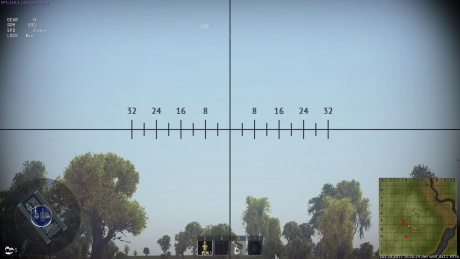
A simple example of the thickness of notches and font size of an IT-1 sight after editing lineSizeMult:r=2.0 and fontSizeMult:r=2.0.
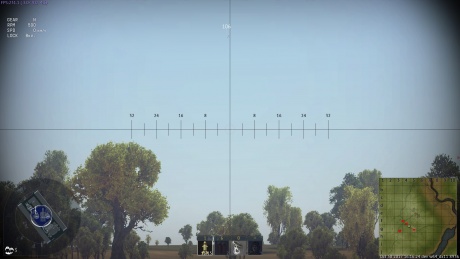
Apart from these settings, the standard sight contains the block crosshair_distances, which determines how regularly the range correction notches will be placed.
Main parameters
A simple example of the thickness of notches and font size of an IT-1 sight after editing lineSizeMult:r=2.0 and fontSizeMult:r=2.0. Apart from these settings, the standard sight contains the block crosshair_distances, which determines how regularly the range correction notches will be placed.
crosshair_distances{
distance:p3=200, 0, 0
distance:p3=400, 4, 0
distance:p3=600, 0, 0
distance:p3=800, 8, 0
distance:p3=1000, 0, 0
distance:p3=1200, 12, 0
distance:p3=1400, 0, 0
distance:p3=1600, 16, 0
distance:p3=1800, 0, 0
distance:p3=2000, 20, 0
distance:p3=2200, 0, 0
distance:p3=2400, 24, 0
distance:p3=2600, 0, 0
distance:p3=2800, 28, 0
 }
crosshair_distances can be set in three ways (important as: the methods cannot be mixed):
   #distance:p2=2800, 28, where 2800 is the distance to the target at which the notch will be drawn; 28 is which text will be placed by the notch (0 means display nothing).
   #distance:p3=2800, 28, 0.01, where 0.01 is how much to increase the length of the notch from the left (-0.01 means extend it from the right).
   #distance { textPos:p2 = 0.042, 0; distance:p3 = 1000, 10, 0.01; }, where textPos is an additional offset of the notch text (textPos:p2 = 0, 0 by default).
distance:p3=200, 0, 0, where the first number is the range correction value for which the notch will be drawn, and the second number indicates the symbol that will display this notch (for the value 0, only a notch without a number is drawn) and the third number is the centering of the notch and its size. A notch can be made of varying length and moved toward or away from the centre of the sight. It works the same with the directional correction line.
crosshair_hor_ranges{
range:p2=-32, 32
range:p2=-28, 0
range:p2=-24, 24
range:p2=-20, 0
range:p2=-16, 16
range:p2=-12, 0
range:p2=-8, 8
range:p2=-4, 0
range:p2=4, 0
range:p2=8, 8
range:p2=12, 0
range:p2=16, 16
range:p2=20, 0
range:p2=24, 24
range:p2=28, 0
range:p2=32, 32
 }
These are the parameters of the standard sight. Apart from these elements, the sight can also contain a few more blocks that provide new options.
Shell ballistics block
The standard sight automatically draws a target reticule on the basis of the ballistic data of the selected shell type. However, with the help of this block, you can create a sight that will permanently display several lines for various types of shells, and their ballistics will correspond to the in-game values. To display these lines, you must add the ballistics block, including the required number of bullet blocks, each of which has its own settings that are responsible for drawing and placing lines. Shell ballistic data, which the game automatically recalculates into the distance between the line notches, are provided by the parameters: bulletType:t = "apcbc_tank" – ID of the ammunition type for which a line needs to be created (see the table of correspondence of shell types in the game localization). speed:r = 624.0 – initial shell speed, which can be seen in the shell’s card along with the name of the shell type.
Important! The lines are linked with ammunition loading. If the tank’s ammunition complement doesn’t have a specific shell type, then the line for that shell type will not be displayed.
Example ballistics block for the T-55A tank and three shell types, APFSD ZBM25, KS-ZBK17 and composite armor-piercing BR-412D:
ballistics {
bullet {
  bulletType:t = "apds_fs_tungsten_small_core_tank"
  speed:r = 1430.0
  drawAdditionalLines:b = no
  drawDistanceCorrection:b = yes
  distanceCorrectionPos:p2 = -0.15, -0.15
  drawUpward:b = yes // option to draw the displayed line upwards, as in the Soviet sights, for example TSh2B-41.
  distancePos:p2 = 0.03, 0.0 // line offset relative to center.
  textAlign:i = 1
  textPos:p2 = -0.012, 0.0
  textShift:r = 0.0
  crosshairDistHorSizeMain:p2 = 0.0075, 0.0075
  crosshairDistHorSizeAdditional:p2 = 0.005, 0.003
  crosshair_distances {
    distance:p3 = 200, 0, 0 // + and - notches
    distance:p3 = 400, 0, 0
    distance:p3 = 600, 0, 0
    distance:p3 = 800, 0, 0
    distance:p3 = 1000, 10, 0.01
    distance:p3 = 1200, 0, 0
    distance:p3 = 1400, 0, 0
    distance:p3 = 1600, 0, 0
    distance:p3 = 1800, 0, 0
    distance:p3 = 2000, 20, 0.01
  }
}
bullet {
  bulletType:t = "heat_fs_tank"
  speed:r = 1085.0
  drawAdditionalLines:b = no // draw notches on the central line
  drawDistanceCorrection:b = no
  distanceCorrectionPos:p2 = -0.09, -0.05
  distancePos:p2 = -0.02, 0.0 //line offset
  textPos:p2 = 0.02, 0.0
  textShift:r = 0.0 //text offset
  textAlign:i = 2 //text position relative to notches
  crosshairDistHorSizeMain:p2 = 0.0075, 0.0075
crosshairDistHorSizeAdditional:p2 = 0.005, 0.003
  crosshair_distances {
    distance:p3 = 200, 0, 0
    distance:p3 = 300, 0, 0
    distance:p3 = 400, 0, 0
    distance:p3 = 500, 5, -0.01
    distance:p3 = 600, 0, 0
    distance:p3 = 700, 0, 0
    distance:p3 = 800, 0, 0
    distance:p3 = 900, 0, 0
    distance:p3 = 1000, 10, -0.01
       distance:p3 = 1100, 0, 0
    distance:p3 = 1200, 0, 0
    distance:p3 = 1300, 0, 0
    distance:p3 = 1400, 0, 0
    distance:p3 = 1500, 15, -0.01
    distance:p3 = 1600, 0, 0
    distance:p3 = 1700, 0, 0
    distance:p3 = 1800, 0, 0
    distance:p3 = 1900, 0, 0
    distance:p3 = 2000, 20, 0
  }
}
bullet {
  bulletType:t = "apcbc_tank"
  speed:r = 887.0
  drawAdditionalLines:b = no // draw notches on the central line
  drawDistanceCorrection:b = no
  distanceCorrectionPos:p2 = -0.09, -0.05
  distancePos:p2 = -0.07, 0.0 //line offset
  textPos:p2 = 0.02, 0.0
  textShift:r = 0.0 //text offset
  textAlign:i = 2 //text position relative to notches
  crosshairDistHorSizeMain:p2 = 0.0075, 0.0075
  crosshairDistHorSizeAdditional:p2 = 0.005, 0.003
  crosshair_distances {
    distance:p3 = 200, 0, 0
    distance:p3 = 300, 0, 0
    distance:p3 = 400, 0, 0
    distance:p3 = 500, 5, -0.01
    distance:p3 = 600, 0, 0
    distance:p3 = 700, 0, 0
    distance:p3 = 800, 0, 0
    distance:p3 = 900, 0, 0
    distance:p3 = 1000, 10, -0.01
    distance:p3 = 1100, 0, 0
    distance:p3 = 1200, 0, 0
    distance:p3 = 1300, 0, 0
       distance:p3 = 1400, 0, 0
    distance:p3 = 1500, 15, -0.01
    distance:p3 = 1600, 0, 0
    distance:p3 = 1700, 0, 0
    distance:p3 = 1800, 0, 0
    distance:p3 = 1900, 0, 0
    distance:p3 = 2000, 20, 0
  }
}
 }
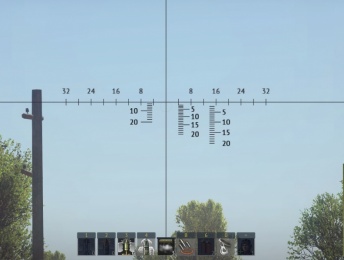
T-55A
Parameters within bullet block:
- bulletType:t = "apds_fs_tungsten_small_core_tank" – shell type
- speed:r = 1430.0 – muzzle velocity
A twin machine gun line can also be set in a bullet block. To do this, enter the following parameters:
- triggerGroup:t = "coaxial" (mandatory)
- speed:r = 815.0[2] [3]
- drawAdditionalLines:b = no – whether the line for this shell should be duplicated (yes/no)
- drawDistanceCorrection:b = yes – whether to display a field in which the numerical value of the range correction will be shown (yes/no)
- distanceCorrectionPos:p2 = -0.15, -0.15 – range correction field offset
- distancePos:p2 = 0.03, 0.0 – line offset relative to center
- textAlign:i = 1 – numerical marker offset on the line relative to notches (-1, 0 or 1);
- textPos:p2 = -0.012, 0.0 – correction offset relative to notches
- textShift:r = 0.0 – text correction offset and downsizing of line notches
- crosshairDistHorSizeMain:p2 = 0.0075, 0.0075 – size and position of notches
- crosshairDistHorSizeAdditional:p2 = 0.005, 0.003 – size and position of additional notches (on vertical sight axis)
- crosshair_distances {
distance:p3 = 200, 0, 0 // range – number – notch size
distance:p3 = 400, 0, 0
distance:p3 = 600, 0, 0
distance:p3 = 800, 0, 0
distance:p3 = 1000, 10, 0.01
distance:p3 = 1200, 0, 0
distance:p3 = 1400, 0, 0
distance:p3 = 1600, 0, 0
distance:p3 = 1800, 0, 0
distance:p3 = 2000, 20, 0.01
}
ID of shell types and their localization in the game
Cannons
| "apcr_tank" | "Armor-piercing composite rigid shell" |
| "apds_tank" | "Armor-piercing discarding sabot shell" |
| "apds_fs_long_tank" | "Armor-piercing fin-stabilized discarding-sabot shell" |
| "apds_fs_full_body_steel_tank" | "Armor-piercing fin-stabilized discarding-sabot shell" |
| "apds_fs_tungsten_small_core_tank" | "Armor-piercing fin-stabilized discarding-sabot shell (steel))" |
| "apds_fs_tungsten_l10_l15_tank" | "Armor-piercing fin-stabilized discarding-sabot shell" |
| "apbc_tank" | "Armor-piercing blunt-nosed shell" |
| "ap_large_caliber_tank" | "Armor-piercing blunt-nosed shell" (Used on the AP shell of the T34/M103) |
| "apc_tank" | "Armor-piercing sharp-nosed shell (with armor-piercing tip))" |
| "aphe_tank" | "Armor-piercing sharp-nosed high-explosive shell" |
| "aphebc_tank" | "Armor-piercing blunt-nosed high-explosive shell" |
| "apcbc_tank" | "Armor-piercing shell with armor-piercing tip and ballistic cap" |
| "ap_tank" | "Armor-piercing sharp-nosed solid shell" |
| "heat_tank" | "High-explosive hollow charge shell" |
| "heat_grenade_tank" | "Anti-tank grenade" |
| "heat_fs_tank" | "High-explosive non-rotating shell" |
| "hesh_tank" | "Armor-piercing incendiary shell" |
| "he_grenade_tank" | "High-explosive grenade" |
| "he_frag_tank" | "High-explosive shell" |
| "he_frag_fs_tank" | "High-explosive shell" |
| "shrapnel_tank" | "Shrapnel" |
| "atgm_tank" | "Anti-tank guided rocket" |
| "rocket_tank" | "Unguided rocket" |
| "smoke_tank" | "Smoke shell" |
Machine guns
| Machine gun | Velocity | Bullet type |
|---|---|---|
| "7_7mm_Type_97_user_machinegun" | 730 | ap_ball |
| "7_7mm_Vikkers_user_machinegun" | 920 | i_t_ball |
| "7_62mm_DT_user_machinegun" | 815 | ap_i_ball |
| "7_62mm_M37_user_machinegun" | 853 | ap_ball |
| 7_62mm_M73_user_machinegun | 853 | ap_ball |
| 7_62mm_M1919A4_user_machinegun | 853 | ap_ball |
| 7_62mm_PKT_user_machinegun | 815 | ap_i_ball |
| 7_62mm_SGMT_user_machinegun | 815 | ap_i_ball |
| 7_62mm_Type74_user_machinegun | 853 | ap_ball |
| 7_92mm_BESA_user_machinegun | 880 | ap_i_ball |
| 7_92mm_MG3_user_machinegun | 853 | ap_ball |
| 7_92mm_MG34_user_machinegun | 880 | ap_i_ball |
| 7_92mm_MG42_user_machinegun | 880 | ap_i_ball |
| 8mm_Breda_Mod38_user_machinegun | 790 | ap_i_t_ball |
| 12_7mm_M2_HB_user_machinegun | 887 | ap_i_t_ball_M20 |
| 14_5mm_KPVT_user_machinegun | 1000 | ap_i_t_ball |
Radial scales and elements (block ballistics/bullet):
- radial:b = no // Choice of scale type
- circleMode:b = no // Draw circles instead of lines on the scale (like on German Tzf9 sights)
- move:b = yes // Move or not with the introduction of correction
- radialStretch:r = 1.0; // Radial scale extension factor (If the points are too close to each other)
- radialAngle:r = 0.0; // The initial angular displacement of the scale in degrees
- radialRadius:p2 = 0, 0; // Radius. x - radius; y - 0 or 1, where 1 means that the radius in the thousandth
In case with the radial scale the parameter crosshairDistHorSizeMain has the following meaning:
- x - circumference thickness
- y - radius of a circle
In case with the radial scale the parameter crosshair_distances/distance.z means the radius of a circle.
drawUpward - changes the scale displaying to a mirror one.
For maximum sight customization, you can use the drawLines and drawTexts blocks, with the help of which you can draw elements from the cutoffs and text, indicating their coordinates:
drawLines {
 line { line:p4 = 0, -1.0, 0, -0.018; move:b = false; }
 line { line:p4 = -50, 30, -50, 40; thousandth:b = true; }
}
To draw one line, you have to enter 4 coordinates – the offset in fractions of the screen of its start and end. line { line:p4 = 0.25, -0.25, 0, -0.0; move:b = false; } – this block draws one line which begins in the upper right quarter of the screen and ends in the center of the screen. It is static and does not move when a range is entered.
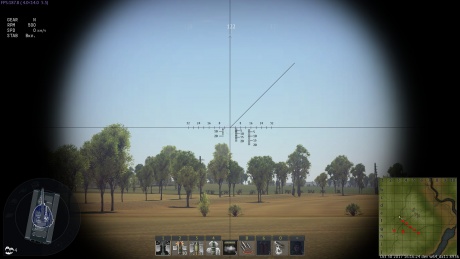
Example of drawing one line
For convenience when creating historical reticules, thousandth can be set to true to represent editing units in mils by indicating the coordinate offset for the start and end of the line in thousands too. When thousandth is set to false, one mil is approximately to 0.04 units
For example, line { line:p4 = -32, -32, 0, 0; thousandth:b = true; } will show a diagonal line extending 32 mils to the left:
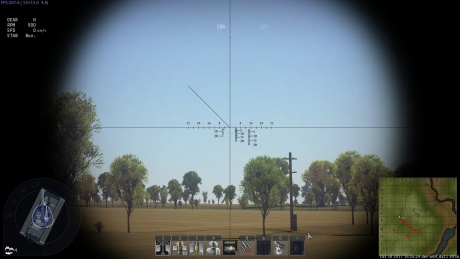
Example of drawing one line with coordinates in the thousands
Drawing Text:
  drawTexts {
    text {
      text:t = "X" // desired symbol
      align:i = 0 // offset relative to its indicated position
      pos:p2 = 32, 0 // coordinates of the X and Y symbol positions in fractions of the screen
      move:b = no // whether the text will move when a range is entered
      thousandth:b = yes // or in thousands
      size:r = 1.7 // text size
    }
  }
Drawing Circles:
  drawCircles {
    circle {
      segment:p2 = 0.0, 360.0; // Sector of a circle
      pos:p2 = 0.0, 90.0; // Position
      diameter:r = 3.0; // Diameter. If thousandth=yes, then in thousandths
      size:r = 2.0; // Line Thickness
      move:b = no;
      thousandth:b = yes;
    }
  }
Drawing painted figures on the basis of a quadrangle. With its help you can draw different types of figures that have 4 vertices and figures of arbitrary shape with 3 (triangle) or 2 (line) vertices.
  drawQuads {
    quad {  // Simple fixed quadrangle
      tl:p2 = -10, -10; // Top left top
      tr:p2 = 10, -10; // Top right top
      br:p2 = 10, 10; // Top right bottom
      bl:p2 = -10, 10; // Top left bottom
      thousandth:b = true;
    }
     quad {  // Object that can be moved along the radius
      tl:p2 = -10, -140;
      tr:p2 = 10, -140;
      br:p2 = 0, -96;
      bl:p2 = 0, -96;
      center:p2 = 0, -90; // The center of the figure is needed for correct rotation. By default the geometric center of a shape.
      radialCenter:p2 = 0.0, 0.0;
      radialAngle:r = 0;
      radialMoveSpeed:r = 6.04;
      moveRadial:b = yes;
      thousandth:b = true;
    }
  }
Example of implementing a historical sight reticule
Using the entire spectrum of possibilities for creating user-made sight reticules, one can create sight reticules that will be as close as possible to the historical versions.
As an example, here is the sight skin of the Italian P40 tank:
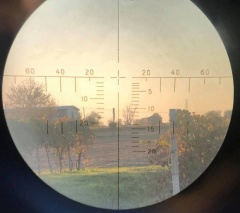
Photo of the real P40 sight.
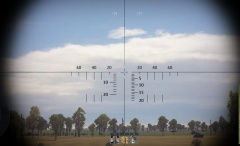
Example implementation of the P40 sight in the game.
And the settings block that can be used to create this sight:
it_san_giorgio_x4 {
  crosshairHorVertSize:p2 = 0, 0
  rangefinderProgressBarColor1:c = 0, 255, 0, 64
  rangefinderProgressBarColor2:c = 255, 255, 255, 64
  rangefinderTextScale:r = 0.7
  rangefinderVerticalOffset:r = 15
  rangefinderHorizontalOffset:r = 5
  fontSizeMult:r = 1.25
  lineSizeMult:r = 1.5
  drawCentralLineVert:b = no
  drawCentralLineHorz:b = no
  crosshairDistHorSizeMain:p2 = 0.03, 0.02
  crosshairDistHorSizeAdditional:p2 = 0.005, 0.003
  distanceCorrectionPos:p2 = -0.2, -0.05
  drawDistanceCorrection:b = yes


  ballistics {
 bullet {
   bulletType:t = "apcbc_tank"
   speed:r = 624.0

   drawAdditionalLines:b = no
   drawDistanceCorrection:b = yes
   distanceCorrectionPos:p2 = -0.15, -0.15

   distancePos:p2 = 0.03, 0.0 // line offset relative to center.
   textAlign:i = 1
   textPos:p2 = -0.012, 0.0
   textShift:r = 0.0
   crosshairDistHorSizeMain:p2 = 0.0075, 0.0075
      crosshairDistHorSizeAdditional:p2 = 0.005, 0.003

   crosshair_distances {
     distance:p3 = 200, 0, 0 // + and - notches
     distance:p3 = 400, 0, 0
     distance:p3 = 600, 0, 0
     distance:p3 = 800, 0, 0
     distance:p3 = 1000, 10, 0.01
     distance:p3 = 1200, 0, 0
     distance:p3 = 1400, 0, 0
     distance:p3 = 1600, 0, 0
     distance:p3 = 1800, 0, 0
     distance:p3 = 2000, 20, 0.01
   }
  t_san_giorgio_x4 {
     crosshairHorVertSize:p2 = 0, 0
     rangefinderProgressBarColor1:c = 0, 255, 0, 64
     rangefinderProgressBarColor2:c = 255, 255, 255, 64
     rangefinderTextScale:r = 0.7
     rangefinderVerticalOffset:r = 15
     rangefinderHorizontalOffset:r = 5
     fontSizeMult:r = 1.25
     lineSizeMult:r = 1.5
     drawCentralLineVert:b = no
     drawCentralLineHorz:b = no
     crosshairDistHorSizeMain:p2 = 0.03, 0.02
     crosshairDistHorSizeAdditional:p2 = 0.005, 0.003
     distanceCorrectionPos:p2 = -0.2, -0.05
     drawDistanceCorrection:b = yes


     ballistics {
    bullet {
      bulletType:t = "apcbc_tank"
      speed:r = 624.0

      drawAdditionalLines:b = no
      drawDistanceCorrection:b = yes
      distanceCorrectionPos:p2 = -0.15, -0.15

      distancePos:p2 = 0.03, 0.0 // line offset relative to center.
      textAlign:i = 1
      textPos:p2 = -0.012, 0.0
      textShift:r = 0.0
      crosshairDistHorSizeMain:p2 = 0.0075, 0.0075
      crosshairDistHorSizeAdditional:p2 = 0.005, 0.003

   crosshair_distances {
     distance:p3 = 200, 0, 0 // + and - notches
     distance:p3 = 400, 0, 0
     distance:p3 = 600, 0, 0
     distance:p3 = 800, 0, 0
     distance:p3 = 1000, 10, 0.01
     distance:p3 = 1200, 0, 0
     distance:p3 = 1400, 0, 0
     distance:p3 = 1600, 0, 0
     distance:p3 = 1800, 0, 0
     distance:p3 = 2000, 20, 0.01
   }
 }

 bullet {
   bulletType:t = "he_frag_tank"
   speed:r = 552.0

   drawAdditionalLines:b = no // draw notches on the central line

   drawDistanceCorrection:b = no
   distanceCorrectionPos:p2 = -0.09, -0.05

   distancePos:p2 = -0.02, 0.0 //line offset
   textPos:p2 = 0.02, 0.0
   textShift:r = 0.0 //text offset
   textAlign:i = 2 //text position relative to notches
   crosshairDistHorSizeMain:p2 = 0.0075, 0.0075
      crosshairDistHorSizeAdditional:p2 = 0.005, 0.003

   crosshair_distances {
     distance:p3 = 200, 0, 0
     distance:p3 = 300, 0, 0
     distance:p3 = 400, 0, 0
     distance:p3 = 500, 5, -0.01
     distance:p3 = 600, 0, 0
     distance:p3 = 700, 0, 0
     distance:p3 = 800, 0, 0
     distance:p3 = 900, 0, 0
     distance:p3 = 1000, 10, -0.01
     distance:p3 = 1100, 0, 0
     distance:p3 = 1200, 0, 0
     distance:p3 = 1300, 0, 0
     distance:p3 = 1400, 0, 0
     distance:p3 = 1500, 15, -0.01
     distance:p3 = 1600, 0, 0
        distance:p3 = 1700, 0, 0
     distance:p3 = 1800, 0, 0
     distance:p3 = 1900, 0, 0
     distance:p3 = 2000, 20, 0
   }
 }
  }
  crosshair_hor_ranges {
 range:p2 = -60, 60
 range:p2 = -50, 0
 range:p2 = -40, 40
    range:p2 = -30, 0
 range:p2 = -20, 20
 range:p2 = 20, 20
 range:p2 = 30, 0
 range:p2 = 40, 40
 range:p2 = 50, 0
 range:p2 = 60, 60
  }

  drawLines {
   // Vertical lines
 line { line:p4 = 0, -1.0, 0, -0.018; move:b = false; }
 line { line:p4 = 0, 0.018, 0,   1.0; move:b = false; }

   // Horizontal lines
 line { line:p4 = -1.0, 0, -0.02, 0; }
 line { line:p4 = 0.02, 0,  1.0, 0; }

   //
 line { line:p4 = -0.002, 0, -0.01, 0.00; move:b = false; }
 line { line:p4 = 0.002, 0,  0.01, 0.00; move:b = false; }

 line { line:p4 = 0.0, 0.002, 0.0, 0.01; move:b = false; }
 line { line:p4 = 0.0, -0.002, 0.0, -0.01; move:b = false; }

 line { line:p4 = -30, 30, -30, 40; thousandth:b = true; }
 line { line:p4 = -40, 30, -40, 40; thousandth:b = true; }
 line { line:p4 = -50, 30, -50, 40; thousandth:b = true; }

 line { line:p4 = 30, 30, 30, 40; thousandth:b = true; }
 line { line:p4 = 40, 30, 40, 40; thousandth:b = true; }
 line { line:p4 = 50, 30, 50, 40; thousandth:b = true; }

 line { line:p4 = -30, 0, -30, 10; thousandth:b = true; }
 line { line:p4 = -40, 0, -40, 10; thousandth:b = true; }
 line { line:p4 = -50, 0, -50, 10; thousandth:b = true; }

 line { line:p4 = 30, 0, 30, 10; thousandth:b = true; }
 line { line:p4 = 40, 0, 40, 10; thousandth:b = true; }
 line { line:p4 = 50, 0, 50, 10; thousandth:b = true; }


 line { line:p4 = 20, 0, 20, 3,5; thousandth:b = true; }
 line { line:p4 = -20, 0, -20, 3,5; thousandth:b = true; }
 line { line:p4 = 60, 0, 60, 5; thousandth:b = true; }
 line { line:p4 = -60, 0, -60, 5; thousandth:b = true; }

 line { line:p4 = 70, 0, 70, 5; thousandth:b = true; }
 line { line:p4 = -70, 0, -70, 5; thousandth:b = true; }
  }
}