Basic information about creating models for Dagor Engine
Custom aircraft models
OLD‑WIKI.WARTHUNDER.COM (DEFUNCT)
Back to War Thunder CDK overview
Installation of 3ds Max plugin
To developing models for the dagor Engine, it currently requires Autodesk 3d studio Max 2011 32 and 64 bit onwards (there are also tools for
versions Max2009, Max2012, Max7, Max9, but these are not actively supported).
To install, the file from your installed copy of 3ds Max should be written into the plugin.ini, the way to the installed WarThunderCDK
and the plugin
For example
[Directories]
Dagor Engine Plugin = C:\WarThunder\WarThunderCDK\dagor3_cdk\plugin3dsMax\Max2011
Your 3ds max is now ready for work
Early easy tutorial
Exporting models from '3D Max' to 'Dagor engine'
Basic information about work with the Dagor Engine and War Thunder models
- The models should be in the metric system of coordinates
- All the objects in the model format should be exported with the Dagor materials
- Export plugin is placed in Utilities (Dagor Scene Export)
- Textures are supported in formats .dds and .tga, TGA is more preferable (as it stores information without compression)
- To review your flight model in AssetViewer, export the model with the name <aircraft_name>.lod00.dag to the folder
<WarThunderCDK>\develop\assets\gameres\aircrafts\<aircraft_name>\
You also need to export 3 LOD models of the aircraft (.lod01.dag, lod02.dag, and lod03.dag) and to place all necessary textures in an understandable format beside the model (see also the next article)
- To review a cockpit model, you should export it with the Dagor materials to the file
<WarThunderCDK>\develop\assets\gameres\cockpits\<aircraft_name>\<aircraft_name>_cockpit.lod00.dag
Cockpit models don't require LOD models.
Work with the model view component AssetViewer
Model view component AssetViewer (which also performs functions of separate assets editor and game resources building-instrument) has an apparent enough interface. The asset list shows not those files the game resources are assembled of, but the game resources themselves. The AssetViewer can also use contiguous resources in the game. Necessary information. All texture converting and model building parameters are placed in the .folder.blk files or, for each particular resource type, in <asset_name>.<asset_type>.blk. The .folder.blk files have a simple enough format and description rules, but these rules will be set forth in a separate article. Controls are very simple in the AssetViewer - by pressing "space", you switch to the flight mode (WASD+mouse), and by repeated pressing of the same key, you return to the standard way of camera control. The menu contains the option "build resources" - it's a possibility to assemble game resource packs for testing (more details in a separate article).

|
Added with the release of the Update 1.77 "Advancing Storm", Dagor Engine 5.0 is now necessary to use. |
Microdetails
Nothing will appear to change for you when creating new objects or viewing the old ones (except for microdetails) in the latest version of War Thunder CDK. However, when you try to open or create an object with microdetails, it will not be displayed correctly since the latter are not yet connected to your AssetViewer.
To connect them you need to:
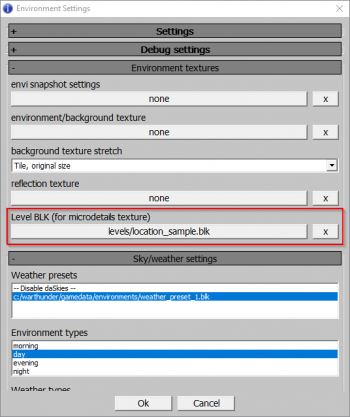
- Go to Environment Settings (“sun” icon).
- Choose the section titled Environment textures.
- In the Level BLK (for microdetails texture) choose WarThunderCDK\levels\location_sample.blk.
- If you are doing the asset for your location, you will need to select‘level.blk’ for your location.
- To learn how to put microdetail in level.blk for your locations, please read the following article "Creating locations”.